Wednesday, May 6, 2015

Transaction Log Physical Architecture


SQL Server uses transaction log for data integrity and data recovery. The sequences of log records are in set of physical files that implement transaction log.

SQL Server divide physical log files in small sized virtual log files, the size and number of virtual log files are decided by SQL server internally;

DBA can never configure virtual log files but can configure the size and number of physical log files.
When a database is created a physical log file is added, let us consider the example physical log file with six logical log files.

When new records are comes in, it added to the end of the logical log and expand toward the end of the physical log file.
Log truncation frees all the virtual log file prior to minimum LSN (minLSN), minimum LSN is the oldest number which require for successful database wide rollback.


When end of logical log reaches start of logical log, two things happens.
1. When physical file growth is enabled a new log record is added to extension
2. When physical file growth is disabled or disk has less space than error 9002 generates.
When database have multiple physical log file than logical file move through all physical files before wrap to first physical log file.

select * FROM sys.fn_dblog (NULL, NULL) // this gives us log file info.


Friday, May 1, 2015

Ghost Records in SQL Server


SQL Server support ghost records concept, ghost records are nothing but are deleted records from leaf node of Clustered/Non clustered index or versioned heap page of table which are just marked as deleted in page header logically but are physically available.
SQL Server supports this concept for faster delete/update operation to get optimum performance.
these logically deleted records (Ghost Records) are purged later using Ghost Records cleanup task which runs in every 5-10 seconds based on SQL Server versions.

We can forcefully clean/purge these ghost records using below DBCC command.
DBCC FORCEGHOSTCLEANUP;


To retain ghost records SQL Server have trace flag 661, this trace flag just disable system defined Ghost Records cleanup task which execute in ever 5-10 seconds.
DBCC TRACEON (661,-1) /* will disable Ghost records clean process */
DBCC TRACEOFF (661,-1) /*will enable Ghost records clean process */

We should always make sure this trace flag is used properly otherwise there will be quite possibility SQL server use a space which is not really required as these deleted records are physically available which are just marked as deleted logically or we can say GHOST RECORDS.

Examples:
/* DROP TABLE GhostRecords */
CREATE TABLE GhostRecords
(GhostId INT Identity(1,1),GhostName VARCHAR(100))

INSERT INTO GhostRecords(GhostName)
VALUES( 'GhostReocrd ' + CAST(ISNULL(IDENT_CURRENT('GhostRecords') ,1) AS VARCHAR))
GO 100

/*Records with Heap Table according to column Index_Type_Desc*/
SELECT 'QUERY1: Heap Table/without cluster Index' TableDetails , Object_name(object_id) AS NAME,record_count, ghost_record_count,
version_ghost_record_count, index_type_desc, alloc_unit_type_desc
FROM sys.Dm_db_index_physical_stats (Db_id(N'GhostRecords'), NULL, NULL, NULL,'DETAILED')
WHERE index_level = 0
AND Object_name(object_id) = 'GhostRecords'

/*Create Clustered & Non Clustered Indexes*/
CREATE CLUSTERED INDEX ClsIdxGhostRecordsId ON GhostRecords(GhostId)
CREATE NONCLUSTERED INDEX NonClsIdxGhostRecordsName ON GhostRecords(GhostName)

/*Records with out Heap Table according to column Index_Type_Desc*/
SELECT 'QUERY2: Without Heap Table/Clustered Table' TableDetails , Object_name(object_id) AS NAME,record_count, ghost_record_count,
version_ghost_record_count, index_type_desc, alloc_unit_type_desc
FROM sys.Dm_db_index_physical_stats (Db_id(N'GhostRecords'), NULL, NULL, NULL,'DETAILED')
WHERE index_level = 0
AND Object_name(object_id) = 'GhostRecords'

DBCC TRACEON(3604,-1)
DBCC IND(Ghostrecords,'GhostRecords',1)

DBCC PAGE(Ghostrecords,1,314,3) /* m_ghostRecCnt = 0 This is Data Page*/
DBCC PAGE(Ghostrecords,1,315,3) /* m_ghostRecCnt = 0 This is IAM Page*/

/* Delete 10 Records from table */
DELETE FROM GhostRecords
WHERE GhostId<=10 /*Not >*/

SELECT 'QUERY3: 10 Records deleted, Ghost Cleanup Process Enabled' TableDetails , Object_name(object_id) AS NAME,record_count,ghost_record_count,
version_ghost_record_count, index_type_desc, alloc_unit_type_desc
FROM sys.Dm_db_index_physical_stats (Db_id(N'GhostRecords'), NULL, NULL, NULL,'DETAILED')
WHERE index_level = 0
AND Object_name(object_id) = 'GhostRecords'

/*Disable Ghost Records Cleanup Task*/
DBCC TRACEON(661,-1)

DELETE FROM GhostRecords
WHERE GhostId<=20 /*Not >*/

SELECT 'QUERY4: 20 Records deleted, Ghost Cleanup Process Disabled' TableDetails, Object_name(object_id) AS NAME,record_count,ghost_record_count,
version_ghost_record_count, index_type_desc, alloc_unit_type_desc
FROM sys.Dm_db_index_physical_stats (Db_id(N'GhostRecords'), NULL, NULL, NULL,'DETAILED')
WHERE index_level = 0
AND Object_name(object_id) = 'GhostRecords'

DBCC PAGE(Ghostrecords,1,314,3) /*m_ghostRecCnt = 10 This is Data Page*/
DBCC PAGE(Ghostrecords,1,315,3) /*m_ghostRecCnt = 0 This is IAM Page*/

/* Enable Ghost Records Cleanup Task */
DBCC TRACEOFF(661,-1)

DBCC PAGE(Ghostrecords,1,314,3) /*m_ghostRecCnt = 0 This is Data Page*/
DBCC PAGE(Ghostrecords,1,315,3) /*m_ghostRecCnt = 0 This is IAM Page*/

SELECT 'QUERY5: Ghost Cleanup Process Enabled' TableDetails, Object_name(object_id) AS NAME,record_count,ghost_record_count,
version_ghost_record_count, index_type_desc, alloc_unit_type_desc
FROM sys.Dm_db_index_physical_stats (Db_id(N'GhostRecords'), NULL, NULL, NULL,'DETAILED')
WHERE index_level = 0
AND Object_name(object_id) = 'GhostRecords'

DELETE FROM GhostRecords
WHERE GhostId<=30 /*Not >*/

SELECT 'QUERY6: 30 Records deleted, Ghost Cleanup Process Enabled' TableDetails, Object_name(object_id) AS NAME,record_count,ghost_record_count,
version_ghost_record_count, index_type_desc, alloc_unit_type_desc
FROM sys.Dm_db_index_physical_stats (Db_id(N'GhostRecords'), NULL, NULL, NULL,'DETAILED')
WHERE index_level = 0
AND Object_name(object_id) = 'GhostRecords'

/*Disable Ghost Record Cleanup Task*/
DBCC TRACEON(661,-1)

DELETE FROM GhostRecords
WHERE GhostId<=40 /*Not >*/


SELECT 'QUERY7: 40 Records deleted, Ghost Cleanup Process Disabled' TableDetails, Object_name(object_id) AS NAME,record_count,ghost_record_count,
version_ghost_record_count, index_type_desc, alloc_unit_type_desc
FROM sys.Dm_db_index_physical_stats (Db_id(N'GhostRecords'), NULL, NULL, NULL,'DETAILED')
WHERE index_level = 0
AND Object_name(object_id) = 'GhostRecords'

DBCC PAGE(Ghostrecords,1,314,3) /*m_ghostRecCnt = 0 This is Data Page*/
DBCC PAGE(Ghostrecords,1,315,3) /*m_ghostRecCnt = 0 This is IAM Page*/

/*Forcefully Start Ghost Cleanup Task*/
DBCC ForceGhostCleanup;

SELECT 'QUERY8: 40 Records deleted, Forcefully Ghost Cleanup Process Enabled' TableDetails, Object_name(object_id) AS NAME,record_count,ghost_record_count,
version_ghost_record_count, index_type_desc, alloc_unit_type_desc
FROM sys.Dm_db_index_physical_stats (Db_id(N'GhostRecords'), NULL, NULL, NULL,'DETAILED')
WHERE index_level = 0
AND Object_name(object_id) = 'GhostRecords'

DELETE FROM GhostRecords
WHERE GhostId<=50 /*Not >*/

SELECT 'QUERY9: 50 Records deleted, Ghost Cleanup Process Disabled' TableDetails, Object_name(object_id) AS NAME,record_count,ghost_record_count,
version_ghost_record_count, index_type_desc, alloc_unit_type_desc
FROM sys.Dm_db_index_physical_stats (Db_id(N'GhostRecords'), NULL, NULL, NULL,'DETAILED')
WHERE index_level = 0
AND Object_name(object_id) = 'GhostRecords'


/* ALTER INDEX ALL ON GhostRecords REBUILD */
ALTER INDEX ALL ON GhostRecords REORGANIZE

SELECT 'QUERY10: 50 Records deleted, Index Reorganized/Rebuild, Ghost Record Removed' TableDetails, Object_name(object_id) AS NAME,record_count,ghost_record_count,
version_ghost_record_count, index_type_desc, alloc_unit_type_desc
FROM sys.Dm_db_index_physical_stats (Db_id(N'GhostRecords'), NULL, NULL, NULL,'DETAILED')
WHERE index_level = 0
AND Object_name(object_id) = 'GhostRecords'

DELETE FROM GhostRecords
WHERE GhostId<=60 /*Not >*/

SELECT 'QUERY11: 60 Records deleted, Ghost Cleanup Process Disabled' TableDetails, Object_name(object_id) AS NAME,record_count, ghost_record_count,
version_ghost_record_count, index_type_desc, alloc_unit_type_desc
FROM sys.Dm_db_index_physical_stats (Db_id(N'GhostRecords'), NULL, NULL, NULL,'DETAILED')
WHERE index_level = 0
AND Object_name(object_id) = 'GhostRecords'

/*Enable Ghost Cleanup Task*/

DBCC TRACEOFF(661,-1)

SELECT 'QUERY12: 60 Records deleted, Ghost Cleanup Process Enabled' TableDetails, Object_name(object_id) AS NAME,record_count, ghost_record_count,
version_ghost_record_count, index_type_desc, alloc_unit_type_desc
FROM sys.Dm_db_index_physical_stats (Db_id(N'GhostRecords'), NULL, NULL, NULL,'DETAILED')
WHERE index_level = 0
AND Object_name(object_id) = 'GhostRecords'

In Below Queries Result watch TableDetails & Ghost record Count

Monday, April 13, 2015

Cardinality Estimation (CE) in SQL 2014


Cardinality Estimation (CE) in SQL 2014
In SQL Server 2014, Cardinality Estimation (CE) has been redesigned to improve
Query plan and therefore query performance, CE help us to find cardinality to predict approximate number of rows comparing to old CE.
To achieve this CE use Exponential Back-off algorithm, this supports OLTP and data warehousing workloads.
New CE get enable when SQL Server compatibility mode is 120 means in case of SQL Server 2014 only, if compatibility mode is less than 120 then it will use old CE.
New Trace flag have been introduced, using these trace flag we can force query to use old CE or new CE.

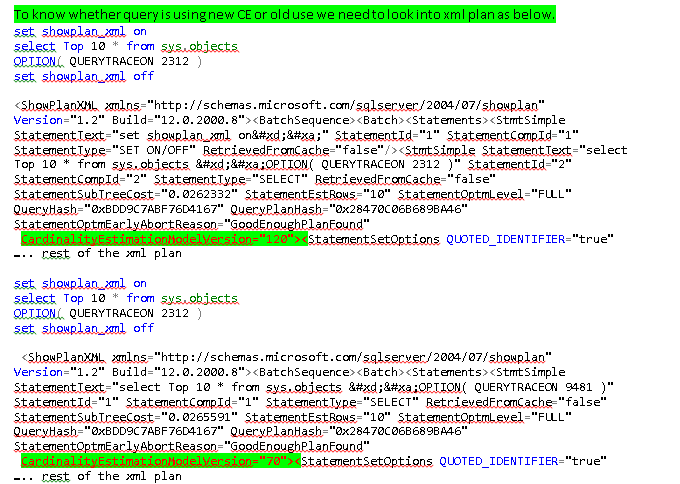
Trace Flag 9481 support old CE and trace Flag 2312 new CE, in any process if both trace flags are used then they cancel each other and use CE based on SQL Server compatibility mode.

We can use new CE or old CE in following options.
For single query, use QueryTraceon option:
/*For Old CE*/
SELECT TOP 10 *
FROM[HumanResources].[Employee] e
OPTION( QUERYTRACEON 9481 )

/*For NEW CE*/
SELECT TOP 10 *
FROM[HumanResources].[Employee] e
OPTION( QUERYTRACEON 2312 )


For session, use DBCC Traceon option:
/* this requires sysadmin permission to enable session specific trace*/
DBCC Traceon(9481) -- for old CE for current session
DBCC Traceon(2312) -- for new CE for current session

For database level use compatibility mode:

For new CE:
ALTER DATABASE AdventureWorks2014
SET COMPATIBILITY_LEVEL = 120

For Old CE:
ALTER DATABASE AdventureWorks2014
SET COMPATIBILITY_LEVEL = 110


For server, use global trace flag:
DBCC Traceon(9481, -1) -- enable old CE globally
DBCC Traceon(2312, -1) -- enable new CE globally

DBCC Traceoff(9481 ,-1) -- disable old CE globally
DBCC Traceoff(2312, -1) -- disable new CE globally

To know the trace flag status execute below dbcc command.
DBCC TRACESTATUS (9481, 2312);
Output:


Let us check the difference in New CE and Old CE using sql server execution plans.
To check this executes below queries in with old and new trace flags in database AdventureWorks2014.
/*Query with old trace flag 9481*/
;WITH [EMP_cte]([BusinessEntityID], [OrganizationNode], [Name], [RecursionLevel])
AS (
SELECT e.[BusinessEntityID], e.[OrganizationNode], p.[FirstName]+ ' '+p.[LastName], 0
FROM [HumanResources].[Employee] e
INNER JOIN [Person].[Person] p
ON p.[BusinessEntityID] = e.[BusinessEntityID]
WHERE e.[BusinessEntityID] = 272
UNION ALL
SELECT e.[BusinessEntityID], e.[OrganizationNode], p.[FirstName] + ' ' + p.[LastName], [RecursionLevel] + 1
FROM [HumanResources].[Employee] e
INNER JOIN [EMP_cte]
ON e.[OrganizationNode].GetAncestor(1) = [EMP_cte].[OrganizationNode]
INNER JOIN [Person].[Person] p
ON p.[BusinessEntityID] = e.[BusinessEntityID]
)

SELECT [EMP_cte].[RecursionLevel], [EMP_cte].[OrganizationNode] as [OrganizationNode],
[EMP_cte].[BusinessEntityID], [EMP_cte].[Name]
FROM [EMP_cte]
INNER JOIN [HumanResources].[Employee] e
ON [EMP_cte].[OrganizationNode].GetAncestor(1) = e.[OrganizationNode]
ORDER BY [RecursionLevel], [EMP_cte].[OrganizationNode]
OPTION( QUERYTRACEON 9481 )

Output of query with Old CE.


/*Query with new trace flag 2312*/
;WITH [EMP_cte]([BusinessEntityID], [OrganizationNode], [Name], [RecursionLevel])
AS (
SELECT e.[BusinessEntityID], e.[OrganizationNode], p.[FirstName]+ ' '+p.[LastName], 0
FROM [HumanResources].[Employee] e
INNER JOIN [Person].[Person] p
ON p.[BusinessEntityID] = e.[BusinessEntityID]
WHERE e.[BusinessEntityID] = 272
UNION ALL
SELECT e.[BusinessEntityID], e.[OrganizationNode], p.[FirstName] + ' ' + p.[LastName], [RecursionLevel] + 1
FROM [HumanResources].[Employee] e
INNER JOIN [EMP_cte]
ON e.[OrganizationNode].GetAncestor(1) = [EMP_cte].[OrganizationNode]
INNER JOIN [Person].[Person] p
ON p.[BusinessEntityID] = e.[BusinessEntityID]
)

SELECT [EMP_cte].[RecursionLevel], [EMP_cte].[OrganizationNode] as [OrganizationNode],
[EMP_cte].[BusinessEntityID], [EMP_cte].[Name]
FROM [EMP_cte]
INNER JOIN [HumanResources].[Employee] e
ON [EMP_cte].[OrganizationNode].GetAncestor(1) = e.[OrganizationNode]
ORDER BY [RecursionLevel], [EMP_cte].[OrganizationNode]
OPTION( QUERYTRACEON 2312 )

Output of query with new CE.


In above execution plans while executing both the queries, first query is with old CE and second is with new CE, in plan query with old CE is taking 97% and with new CE is taking 3%

Summary

• The new CE is calculating combined filter density/selectivity differently
• The new CE is treating ascending/descending key scenarios differently
• There are significant changes in how column densities of different tables in join situations are evaluated and density between those calculated.
• The different changes in calculation can end up in different plans for a query compared with the old cardinality estimation
• It is not necessary in every scenarios new CE query will get benefited, there is quite possibility that old CE may perform better comparing to new CE


Monday, April 6, 2015

SQL Server Query Optimizer Inputs


At a very high level, the Query Optimizer consider the following inputs During Compilation & Query Execution

• Column data types used in query
• Data types of indexed columns
• The SQL Query and/or Stored Procedure
• If the query or stored procedure is parameterized, then the value of the parameters
• Knowledge about the index structures of table(s) to be accessed
• Statistics of index(es) and columns of the table(s) to be accessed
• Index Fragmentation and Fill Factor percentage
• Hints assigned to the query/Join
• Cost threshold for parallelism
• Global max degree of parallelism setting
• Option (Maxdop ?) // where? is integer value
• Cardinality Estimation(specially SQL Server 2014)
         o Trace Flag 9481 for Old
         o Trace flag 2312 for New
         o Database Compatibility Level
         o Version of Database
• The way Query/Procedure written to get result
• Server/memory pressure
• Database status(locking/blocking/pressure/plan etc)

Note:
There might be some other inputs which query optimizer consider but above are very high level points which we need to take in consideration.


Friday, March 20, 2015

CXPacket Wait in SQL Server


CXPACKET
Occurs with parallel query plans when trying to synchronize the query processor exchange iterator. If waiting is excessive and cannot be reduced by tuning the query (such as adding indexes), consider adjusting the cost threshold for parallelism or lowering the degree of parallelism.

CXPacket wait occurs when we use multiple processors/thread to execute a query.
When a server has multiple CPU, we can configure setting to use multiple cpu/thread, if query is taking
Excess time compare to approximate time of a query.

We can define this setting using “cost threshold for parallelism”, having default value 5 seconds, we can change values to something else based on our requirement
Suppose we have mentioned 100 seconds and if any query is taking more than 100 seconds then it will start parallel processing based on the configuration values of server max degree of parallelism.
According to below screenshot our server has two CPU’s, CPU0 and CPU1 and let us
Change the server configuration values “cost threshold for parallelism” to 100 and max degree of parallelism to 2.

Using this configuration query will start using two cpu/thread, if query takes more than 100 seconds.
According to below Figures A and B, we have two cpu, defined “cost threshold for parallelism” to 100 and max degree of parallelism to 2, highlighted in color yellow and black in figure A and Figure B respectively
Figure A


Figure B


We can change these setting using system defined stored procedure sp_configure.
As per below setting, if any query taking more than 100 seconds will qualify for parallel processing and SQL server will create and execute parallel plans using two thread(CPU0 & CPU1)

EXEC sys.sp_configure N'cost threshold for parallelism', N'100'
GO
EXEC sys.sp_configure N'max degree of parallelism', N'2'
GO
RECONFIGURE WITH OVERRIDE
GO


We can also set parallel thread setting using OPTION (MAXDOP 2) at query level like below
Let us create table CXPacketInfo in tempdb database and insert 100000 rows

USE TEMPDB

CREATE TABLE CXPacketInfo (CX_id INT, CXO_id INT, CX_amount INT, CX_description CHAR(2000))


BEGIN TRAN
DECLARE @i INT
SET @i = 1

WHILE (@i <= 100000 ) /*>*/
BEGIN

INSERT INTO CXPacketInfo VALUES (@i % 1, @i, RAND() * 100000, REPLICATE('a', 2000))
SET @i = @i + 1

END

COMMIT TRAN


SET STATISTICS time ON
GO

/*Execute query with single thread & Clear the wait stats entry in dmv sys.dm_os_wait_stats */


DBCC sqlperf('sys.dm_os_wait_stats', clear)

DECLARE @order_amount INT
SELECT @order_amount= Max(CX_amount)
FROM CXPacketInfo o
OPTION (maxdop 1) /* Execute query with single thread */


SELECT * FROM sys.dm_os_wait_stats
WHERE wait_type = 'CXPACKET'


Output:Output of dmv is showing 0 waiting_tasks_count and 0 wait_time_ms

wait_type waiting_tasks_count wait_time_ms max_wait_time_ms signal_wait_time_ms
CXPACKET 0 0 0 0


Execution Plan: In execution plan we can see query is only using single thread and this single thread is processing 100000 Rows without parallelism.


Execution Plan A:


/*Execute query with single thread Clear the wait stats entry in dmv sys.dm_os_wait_stats */

DBCC sqlperf('sys.dm_os_wait_stats', clear)

DECLARE @order_amount INT

SELECT @order_amount= Max(CX_amount)
FROM CXPacketInfo o

OPTION (maxdop 2) /* Execute query with two threads */

SELECT * FROM sys.dm_os_wait_stats
WHERE wait_type = 'CXPACKET'

Output: Output of dmv is showing 4 waiting_tasks_count and 65 wait_time_ms


wait_type waiting_tasks_count wait_time_ms max_wait_time_ms signal_wait_time_ms
CXPACKET 4 65 65 0


Execution Plan: In execution plan we can see query is using two threads and these two threads are processing 100000 Rows.
In Right hand rectangle box following Threads are used


Thread Rows Comments
Thread 0 0 Organizer Thread
Thread 1 55280 First Thread
Thread 2 44720 Second Thread

Thread 0 is organizer thread, when processing threads (Thread 1 & Thread 2) have time differences for processing the rows then organizer thread (Thread 0) has to wait for lacking behind thread, this wait we called CXPacket wait.
In plan we can also see parallelism is used in below execution plan marked in rectangle.


Execution Plan B:


Here's a list of additional considerations:
Make certain statistics are up-to-date; the optimizer thrives—or dies—based on up-to-date statistics.
• Fragmentation of internal structures & external disk must be kept low.
• In no case should max degree of parallelism be set to a value higher than the number of physical cores.
• For most servers max degree of parallelism should be set to no more than eight, even if more than eight cores are available.
• For NUMA-enabled servers, max degree of parallelism should not exceed the number of cores assigned to each NUMA node.
• Hyper-Threading often (not always) compromises SQL Server performance. My recommendation: In the absence of unequivocal supporting evidence that H-T enhances performance in your environment, H-T should be disabled.
• OLTP – parallelism can have a negative impact on performance.
• OLAP/reporting benefits from parallelism.
• Look at your plan cache, which of your queries use parallelism
• Check query plans – do you have missing indexes or out of date statistics
• What other waits are occurring that might be causing CXPACKET
• Consider using MAXDOP to fine tune specific queries.
• Set max degree of parallelism and cost threshold for parallelism to best suit your server’s function.
• Do not adjust max degree of parallelism without proper analysis of your servers workload/queries

Friday, January 2, 2015